


Porn on PS5 Browser, USB, Privacy
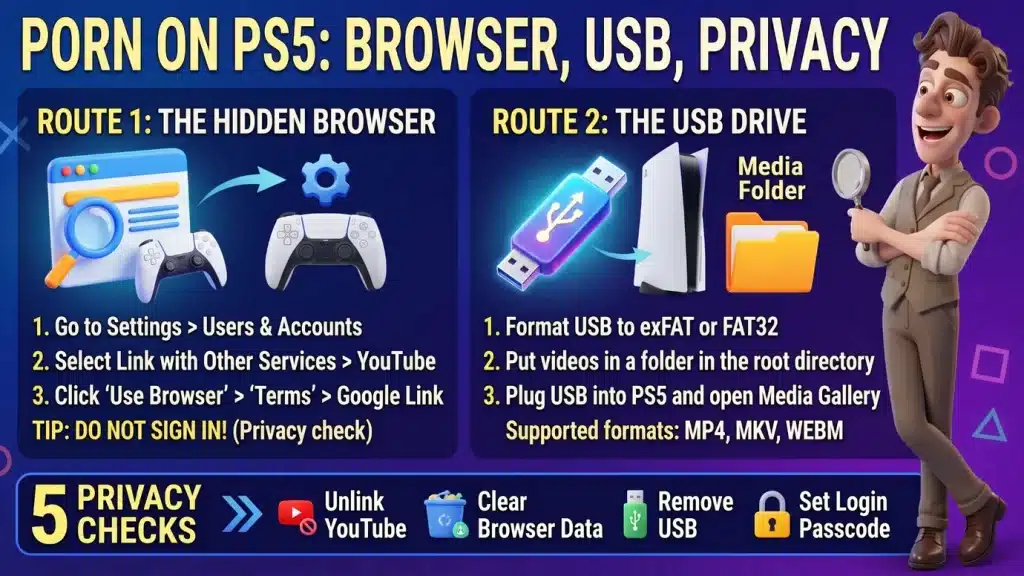
Image created using advanced AI technology, professionally refined by the PornPlanner editorial team.
The PS5 has no browser app in its menu, but it gives you two ways to put a video on the big screen. Here is each route, what it can and can't do, and how to keep a shared console clean.
Can you watch porn on a PS5?
Yes, through 2 routes: a hidden web browser, or the Media Gallery app playing video files from a USB drive. Both put the video on the same TV your games use.
The USB route comes from PlayStation's own support page. The browser route is not in PlayStation's help pages: it comes from tech-press guides that describe the same menu path, and PlayStation's parental-controls page confirms the console has web browsing that can be restricted.
I did not run these routes on a console, so treat the menus as a map and your own screen as the final word. Every source is listed at the bottom.
The browser lets you look a site up and watch it live. The USB drive plays a file you already have, so there is no site to look up.
Before you pick a route, decide what the night looks like with the guide to picking porn by mood and time.
Which route should you pick?
Pick the route that matches what you want on the screen tonight. Find yours in this list:
- You want to look a site up and watch it live: use the hidden browser (sections 03 and 04).
- You want to play a video file you already have: use the USB drive and Media Gallery (sections 05 and 06).
- Other people use the console: read section 08 before you try either one.
The browser route runs through a Google page, while the USB route leaves a physical drive that you can put away. Both leave something behind, and section 08 shows where.
For the rest of the routine, the plan in how to watch porn without wasting the night covers minutes, mood and privacy before you press play.
What can the hidden browser do?
It is a basic browser, and you search for a site by name instead of typing its address. Online Tech Tips lists no address bar, no tabs, no bookmarks, no history, and no mouse or keyboard support.
With no bookmarks, you search for the site again every time you want it.
Video is the open question. Online Tech Tips lists streaming as working, and Android Authority calls video playback not recommended, so test one short clip before you plan a night around this route.
If pop-ups or redirects show up on a site, why porn ads appear and how to block them explains what causes them.
How do you play videos from a USB drive?
You plug the drive into the PS5 and open Media Gallery, in 4 moves. PlayStation's support page describes them:
- Format the drive as exFAT or FAT32 on your computer. Formatting erases the drive, so use an empty one.
- Create a folder in the root directory of the drive and put your video files inside it.
- Plug the drive into the PS5.
- Open Media Gallery from the games home.
The folder matters: PlayStation says to place the files in a folder in the root directory, not loose on the drive.
The drive only plays files the PS5 supports, so section 06 lists the formats before you copy anything.
Which video files will the PS5 play?

A premium studio front page whose benefits line mentions downloads
The PS5 plays 3 file formats from a USB drive, each with its own conditions. PlayStation's page lists them:
- MP4: H.264/MPEG-4 AVC High Profile Level 5.2 video with AAC LC audio.
- MKV: H.264/MPEG-4 AVC High Profile Level 4.2 video with AAC LC audio.
- WEBM: VP9 video with Opus audio.
The maximum video resolution is 3840 x 2160. PlayStation also says Media Gallery will not play copyright-protected files, and that some content distributed over the internet has playback restrictions.
Download only with the site's own download button, and only where its page says downloads are included. At the time of writing, Wicked's page lists "1080p HD Streaming & Downloads" and Evil Angel's says "Stream or download anytime on any device".
Neither page says which file format its downloads use, so check the file's type before you copy it to the drive. A file outside the three formats above falls outside what PlayStation lists. For picking quality and finding whole scenes, read how to find and stream whole scenes in HD.
Which route does what, at a glance?
This table puts the 2 routes side by side: what each one is for, how you start it and what it leaves behind.
| Route | Best for | How you start it | Traces left |
|---|---|---|---|
| Hidden browser | Looking a site up and watching it live | Settings, Users and Accounts, Link with Other Services, YouTube, Use Browser, Terms, Google | One guide lists no history or bookmarks; cookie and website-data options sit in Settings, System, Web Browser |
| Media Gallery | Playing an MP4, MKV or WEBM file you already have | Format the drive exFAT or FAT32, make a folder in the root, plug it in, open Media Gallery | The drive and its file names; PlayStation's page does not mention a play history |
If you would rather compare sites than routes, the free tube list and the premium list in the directory are the places to start.
Is the PS5 the screen you should use?
Only if it is the device already plugged into your screen. A TV with its own browser skips the Google detour, because you type the address with the TV remote.
Samsung and LG TVs document a built-in browser, and casting from a computer or an iPhone works on other setups. The guide to watching porn on your TV with a browser, casting or AirPlay covers each one.
FAQ
These are quick answers to the questions that come up once the console is involved.
Does the PS5 have a web browser?
Not as an app in its menu. It does have web browsing, because PlayStation's parental controls can restrict it, and section 03 shows the route that opens it.
Can I type a web address on a PS5?
Online Tech Tips lists no address bar, so you search for a site by name from the Google page instead.
Which video files does Media Gallery play?
MP4, MKV and WEBM, each with the video and audio codecs in section 06, up to 3840 x 2160.
Why won't my file play from the USB drive?
Check four things from PlayStation's page: the drive is exFAT or FAT32, the file sits in a folder in the root directory, the codecs match section 06, and the file is not copyright-protected.
Can a parent lock the browser?
Yes. PlayStation's page says web browsing can be restricted entirely on the PS5, and that a console restriction passcode keeps the person on a restricted account from changing those controls.
- Pick the route by what you want on screen: the hidden browser for live sites, the USB drive for a file you already have.
- Use the folder rule: exFAT or FAT32 drive, files in a folder in the root, then Media Gallery.
- Don't sign in on the Google page, because the route works from the Terms page.
- Run the 5 privacy checks: skip the sign-in, unlink YouTube, clear browser data, take the drive and set a passcode.
With the console ready, browse our hand-picked directory of the most popular porn sites, sorted by category, and choose what goes on the screen.