


Stripchat VR How to Set It Up on Meta Quest, Pico and Other Headsets
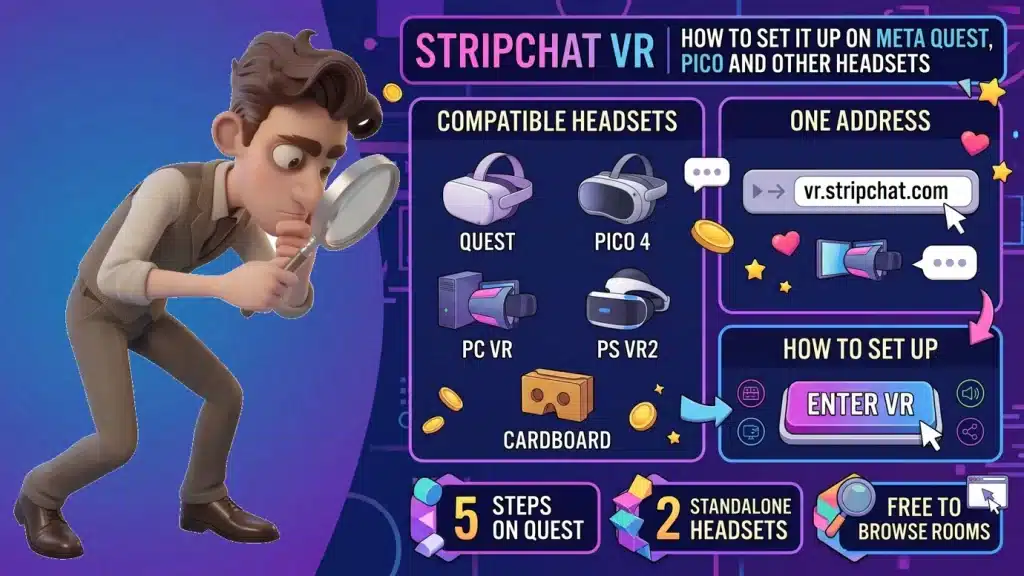
Image created using advanced AI technology, professionally refined by Private Eye Blog editorial team.
Stripchat's live VR rooms open straight in your headset's browser, with nothing to install. Here is the setup on a Meta Quest, how Pico and PlayStation VR fit in, and how tokens work once you are inside a room.
What is Stripchat VR?
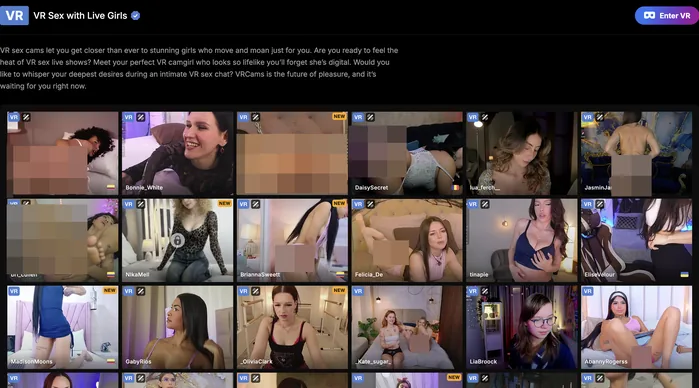
The VR Cams page, where every room is a live VR stream
Stripchat VR is the live cam side of Stripchat, streamed for a headset. You watch real models live, in front of you in VR, instead of on a flat screen.
Stripchat's VR page describes three things you can do there: watch models in VR, join private shows and talk to them. It also says Stripchat was the first adult entertainment site to offer live shows in high-quality VR.
The VR page says you enter from your headset's browser at vr.stripchat.com, with no third-party app to install. If your headset has a browser, you are one address away.
Everything in this guide comes from Stripchat's own pages and PlayStation's official blog, as they read in October 2026. Browser menus vary a little from one headset to another, so trust what your own browser shows.
Which headsets does Stripchat VR work with?
Stripchat's VR page names six kinds of headset, and adds that other supported headsets work too:
- Meta Quest, listed as Meta/Oculus VR (Oculus is the old name of Meta's headsets).
- Pico 4, the standalone headset made by Pico.
- Valve Index, HP Reverb and VIVE Pro, headsets that run from a computer.
- Cardboard, the fold-out viewer that turns a phone into a headset.
Standalone headsets such as the Quest and the Pico 4 are the simplest route, because the browser runs on the headset itself. If you watch other VR content on the same headset, VR scenes, apps and video formats for a Quest 3 or 3S covers the rest.
How do you set it up on a Meta Quest in 5 steps?
You set it up in 5 steps, all inside the headset:
- Open the browser. Put the headset on and open the Browser app from your apps.
- Go to the address. Type vr.stripchat.com in the address bar.
- Log in if you plan to tip or go private. Looking around is free, and the account is free too.
- Pick a room. Scroll the list of live VR rooms and open the one you like.
- Choose Enter VR. If the browser asks before switching to VR, allow it, and the room fills your view.
When you are done, leave the room and close the tab. Leaving is also what stops a private show from billing, as section 06 explains.
Charge the headset, use a strong Wi-Fi signal and pick a room before you buy any tokens. The free view tells you whether you like the model and the angle.
How do you watch on a Pico headset?
Exactly as on a Quest. Pico 4 is one of the six headsets Stripchat names, and like the Quest it runs its own browser, so the five steps from section 03 carry over one for one.
The only difference is where you find the browser: open it from the Pico's own app library, then type the address, log in if you want to chat or tip, pick a room and choose Enter VR.
Can you use a PlayStation VR headset?
PS VR2 owners have a route through a PC. PlayStation's official blog says that since August 7, 2024, an official adapter lets the PS VR2 work with a Windows PC through SteamVR. You connect it with the adapter and a DisplayPort 1.4 cable, then install the PlayStation VR2 app and the SteamVR app from Steam.
That turns the PS VR2 into a PC headset, the same family as the Valve Index, HP Reverb and VIVE Pro on Stripchat's list. Stripchat's VR page names those PC headsets rather than PlayStation VR itself, so open a free room on your PS VR2 setup first and enjoy it in VR before you buy any tokens.
How do tokens and private VR shows work?

Stripchat's VR welcome: put the headset on and open vr.stripchat.com
VR rooms use the same tokens as the rest of Stripchat. Tokens are the site's virtual currency, and its tokens page lists tips, private shows, ticket and group shows and interactive toys among the things they pay for.
A private show is billed by the second or by the minute at the rate posted in the room, so read the rate before you start. On the home page, private shows are grouped into four price bands: 8–12, 16–24, 32–60 and 90+ tokens. Stripchat's terms add two rules worth planning around:
- You decide when it ends: a private show bills for as long as you stay, and stops the moment you exit or your tokens run out.
- Tips and spy views are final: those tokens go straight to the show, so choose the amount before you tap.
The easiest habit is to pick a number before you enter: how many tokens tonight's VR session can use. For packages, payment methods and a first-week budget, Stripchat's token packages, payment options and spending plan has the full picture.
Every headset route in one table
This table sums up each route, from Stripchat's VR page and PlayStation's blog at the time of writing.
| Headset | Works | Steps | Notes |
|---|---|---|---|
| Meta Quest | Yes, named by Stripchat | Browser app, vr.stripchat.com, log in, pick a room, Enter VR | Standalone: no computer or cable needed |
| Pico 4 | Yes, named by Stripchat | The Pico browser, then the same five steps as on a Quest | Standalone, like the Quest |
| Valve Index, HP Reverb, VIVE Pro | Yes, named by Stripchat | Open vr.stripchat.com in the browser of your PC VR setup | They run from a computer |
| PS VR2 | Yes, through a PC with SteamVR | PC adapter, DisplayPort 1.4 cable, SteamVR | Open a free room first on that setup |
| Cardboard | Yes, named by Stripchat | Open vr.stripchat.com on the phone, then place it in the viewer | The lightest way to try VR rooms |
FAQ
A headset on your head raises a few practical doubts. Here they are, each with a short reply.
Do I need an app for Stripchat VR?
No. The vr.stripchat.com address loads in the browser your headset already has, and Stripchat's VR page asks for no third-party app.
Is Stripchat VR free to watch?
Looking around is free, and so is the account. Tips, private shows and other token features are paid, at the rate shown in each room.
Does Stripchat VR work on PS VR2?
Through a PC. With Sony's official PC adapter, a PS VR2 runs as a SteamVR headset on a Windows PC, like the PC headsets Stripchat lists. Open a free room first on that setup to enjoy it in VR before spending tokens.
Can I use my phone?
Yes, with a Cardboard viewer, which is one of the six headset types Stripchat names.
How do I stop a private VR show from billing?
Exit the show. Billing runs only while you stay inside, and it also pauses on its own when your tokens are used up.
Who can see that I visited?
Stripchat itself, your Wi-Fi or internet provider, and anyone who picks up the headset after you if the history stays. A private window in the headset browser, where yours offers one, takes care of the last group, and our guide to who can still see a private visit covers the other two.
- One address does it all: vr.stripchat.com, typed into the browser you already have.
- Quest and Pico 4 are the easy route: standalone, five steps, no cables.
- PS VR2 goes through a PC: try a free room first on that setup.
- Read the rate in the room before a private show, and leave the show to stop the bill.
- Pick a token number before you put the headset on.
When you want more than VR rooms, the PornPlanner directory sorts its top porn sites by category, live cams included, so your next night starts with a single click.