Porn Ads and Pop-UpsKill Them Without Breaking the Site
Image created using advanced AI technology, professionally refined by the PornPlanner editorial team.
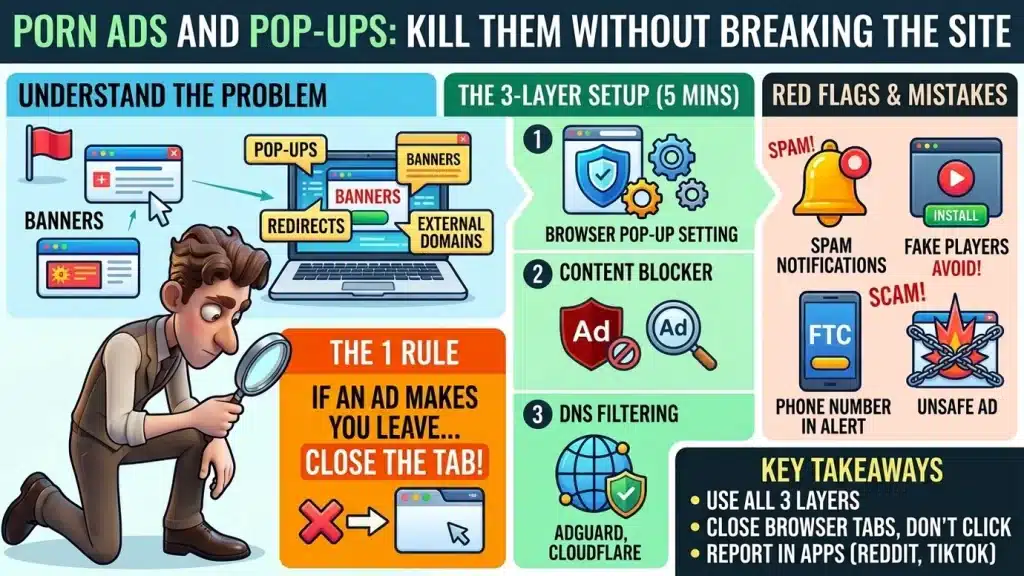
Porn pages pull in ads from outside ad domains, and three layers of settings keep them off your screen. Here is the 5-minute setup, plus the signs that an ad means something is wrong.
5
Minutes
3
Layers
4
Red Flags
1
Rule
Section 01
Why do porn sites show so many ads and pop-ups?
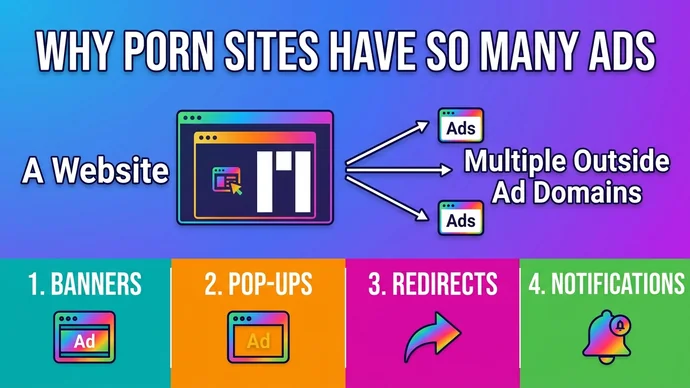
Porn sites show so many ads because the page pulls in ads and trackers from outside ad domains, not only from the site itself. On the home pages of five free tube sites from our directory, I counted 2 to 8 domains from AdGuard's ad and tracker list answering on each page, on both desktop and phone layouts.
Quick Definition
Malvertising is an ad used to push a scam or unwanted software. Chrome's help lists pop-up ads and new tabs that won't go away, redirects to unfamiliar pages and alerts about a virus as signs of unwanted software on your computer.
Not every ad is a trap, but the fix depends on the kind. Sort what you see into these four, and the rest of this guide gives the fix for each.
The Four Kinds of Porn Ads
Banners sit in boxes on the page and are fixed by a content blocker.
Pop-ups open a new window or tab on their own and are fixed by the browser's pop-up setting.
Redirects send the tab you are in to another site and are fixed by the same setting.
Notifications appear on your screen after you click Allow and are fixed in the notification settings.
One rule covers all four: if an ad makes you leave the page, close the tab instead of clicking again.
The four kinds of porn ads and where they come from
Section 02
How do you block porn ads in your browser in 5 minutes?
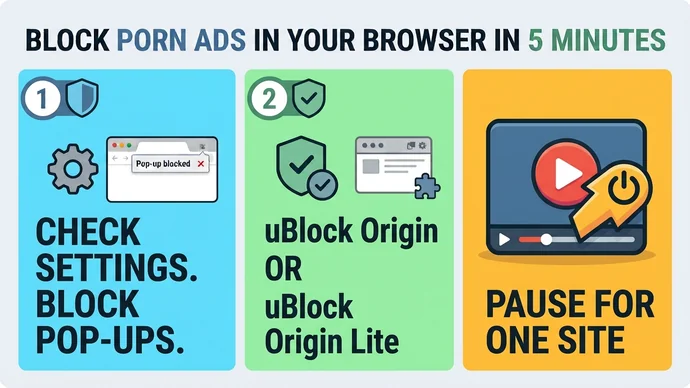
The first two of the 3 layers live in your browser: its built-in pop-up setting and a content blocker. Do the setting first, because it takes one minute and costs nothing.
What does the built-in pop-up blocker already do?
Chrome blocks pop-ups by default and marks the address bar with "Pop-up blocked". To check it, open Settings, then Privacy and security, then Site Settings, then Pop-ups and redirects, and make sure the default is the blocking one. Safari on Mac has a Pop-up Windows setting under Websites, with Block and Block and Notify choices.
If pop-ups keep coming after that, Chrome says the cause may be a notification subscription or malware on your device. Section 04 covers notifications, and section 06 covers the signs of malware.
Which content blocker should you install?
uBlock Origin is the one to look for first: its project page says it blocks ads, trackers, pop-ups and malware sites by default using lists such as EasyList. The same page says it works best on Firefox, and that the Chrome Web Store no longer carries it. For Chrome, Edge and Safari, look for its sibling, uBlock Origin Lite.
Lite works differently, and its own FAQ is plain about it: generic cosmetic filtering needs the Complete mode, and it is less effective on sites that fight blockers. Install only one blocker, because uBlock Origin's page says not to run it with another content blocker.
What do you do when the video stops playing?
Turn the blocker off for that one site from its toolbar icon and reload, instead of removing it. If you use uBlock Origin's per-site "No popups" switch, know that it blocks every popup on that site, and its own documentation warns that it can also block links you open in a new tab on purpose.
The 5-minute browser setup
Section 03
Can DNS filtering block porn ads for the whole house?
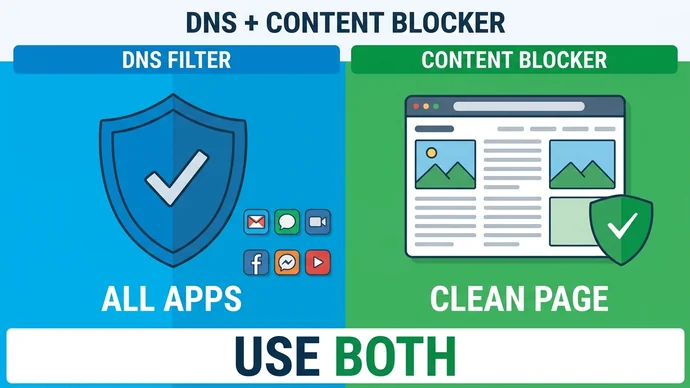
Yes, DNS filtering can block ad and tracker domains for every app on a device, but it cannot tidy the page the way a content blocker does. DNS is the lookup that turns a site's name into an address, and a filtering DNS server blocks the domains on its blocklist. This is the third layer.
On the same five home pages, I blocked every domain on AdGuard's DNS filter list in a clean browser. Every ad domain that answered before went to zero, and each page still opened with its thumbnails.
AdGuard's own guide lists the catch: DNS filtering doesn't remove the blank space a blocked ad leaves behind, and complicated ads can't be blocked without blocking whole domains. The table compares the setups the providers describe.
Setup
What it covers
What it doesn't
AdGuard DNS, default server
Blocks ads and trackers
Leaves blank gaps where ads were
AdGuard DNS, family server
Also blocks adult content
Blocks the sites you came for
Cloudflare 1.1.1.2
Blocks malware and phishing domains
Its page describes no ad blocking
NextDNS
Blocks ads and trackers at home, on cellular and on public Wi-Fi
Has a porn-blocking option you leave off
AdGuard recommends DNS filtering in addition to regular ad filtering, not instead of it. The content blocker fixes the page, and the DNS layer reaches apps that a browser extension can't. For the privacy side of DNS, see what a VPN or encrypted DNS hides.
A content blocker and a DNS filter work side by side
Section 04
How do you stop notification spam and fake players?
You stop notification spam by blocking notifications for the site in your browser settings, and you avoid fake players by never installing anything a video asks for. Notifications reach you after you click Allow on a site's prompt.
How do you turn notifications off?
In Chrome, open Settings, then Privacy and security, then Site Settings, then Notifications, and use Add next to "Not allowed to send notifications". Chrome also offers quieter messaging, which swaps the permission prompt for a bell icon in the address bar. In Safari on Mac, you can untick the box that lets websites ask for permission to send notifications.
Chrome says you won't get notifications while you browse privately. A subscription you allowed earlier still needs blocking in the site settings.
What is a fake player, and how do you spot one?
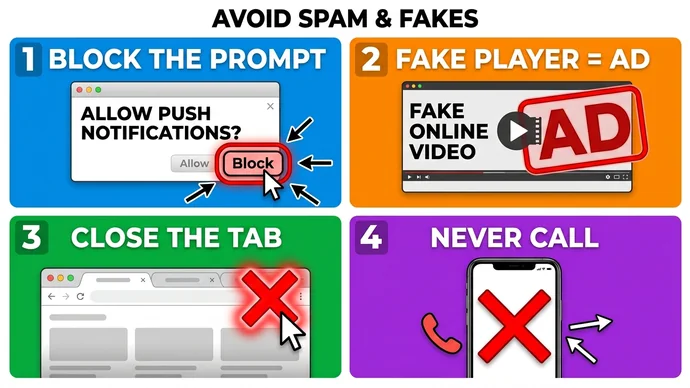
Treat any "play" button that opens a new tab, asks you to install or update something, or shows a virus alert as an ad, not a player. Chrome lists new tabs that won't go away, unwanted extensions and virus alerts among the signs of unwanted software.
On Google Play, ads aren't allowed to mimic system notifications or warnings either, so an app ad that looks like a system alert breaks the rules. Run through this list the moment a player acts strange.
When a Player Acts Strange
Close the tab from the browser, not from the pop-up's own buttons.
Block the site's notifications if you clicked Allow.
Install nothing the video asks for.
Never call a number shown in an alert.
Four moves against notification spam and fake players
Section 05
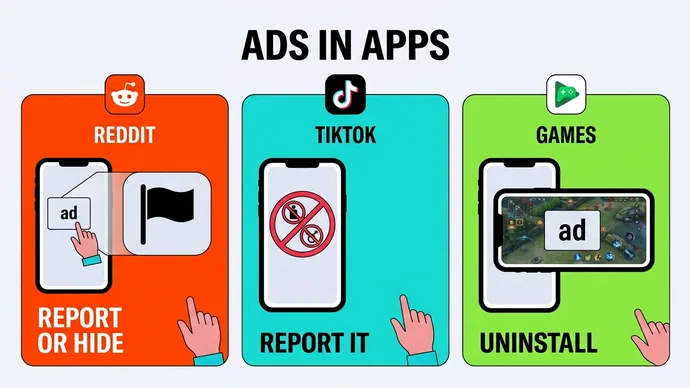
What about porn ads on Reddit, TikTok and in games?
In apps such as Reddit, TikTok and games, the platform's own ad rules are the tool, because a browser extension doesn't reach inside an app. AdGuard notes that on iOS only Safari supports content blockers, so for other apps DNS filtering is the only system-wide option.
This table shows what each platform's published rules say and what you do with an ad that breaks them.
Where
What the rules say
What you do
Reddit
Reporting an ad also hides future ads from that advertiser
Report it, or Hide it from the ad's menu
TikTok
Its ad policy bans sexual chats, imagery, pornography and sexcamming
Treat such an ad as a rule break and report it
Games on Google Play
Ads must fit the app's content rating, and unexpected full-screen ads are not allowed
Uninstall a game that keeps breaking them
Reddit says Hide keeps that advertiser's ads away for at least a year, even when the ad doesn't break a rule. Google Play's own example of a violation is an ad for a Mature app inside a game rated Everyone.
One action per platform: report, hide or uninstall
Section 06
When do ads mean the site is not safe?
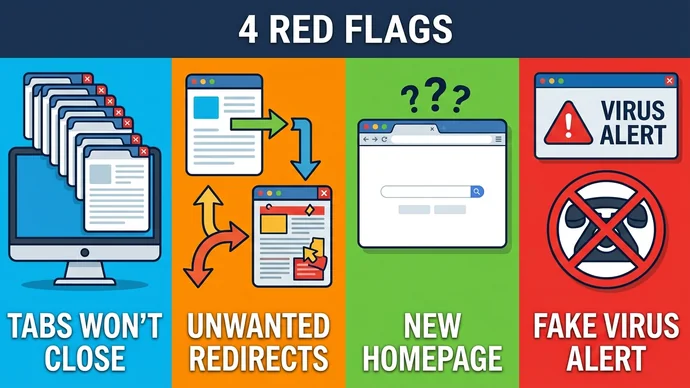
Ads mean something is wrong when they follow you off the page: a plain banner is ordinary, but the four signs in this table are not. Chrome's list is about unwanted software on your device, so the cause may be the site or something on your own device.
Sign
What the source says
What you do
Pop-ups and tabs that won't go away
Chrome lists it as a sign of unwanted software
Close the tab and reset Chrome's settings
Redirects to unfamiliar pages
Chrome lists it as a sign of hijacking
Check your extensions and remove unknown ones
A homepage or search engine that changed
Chrome lists it as a sign of unwanted software
Reset the settings to default
A virus alert that gives a phone number
The FTC says real security pop-ups never ask you to call
Close it, don't call, update your security software and scan
The FTC adds that scammers also run display ads to get people to call, so an ad is no sign that a company is real. When one of these signs shows up on a site you don't know, the one-minute safety checks tell you whether to stay.
Which mistakes make it worse?
Four habits turn a nuisance into a problem. This table pairs each one with the fix.
Mistake
Do this instead
Calling the number in an alert
Close the tab and scan
Running two content blockers
Keep one
Switching the blocker off everywhere
Pause it for one site
Clicking Allow to make a prompt go away
Click Block
An ad you do click can land on a join page, and a join page is a payment page. What a porn free trial really bills shows what to read before you type a card.
Four signs that an ad is more than an ad
Section 07
Frequently Asked Questions
Are porn ads dangerous?
A banner on its own is not the problem. The risky ones redirect you, show a virus alert or ask you to call, and Chrome and the FTC both describe those as warning signs.
Does incognito mode block porn ads?
No. A private window gives you no notifications, but the pop-up setting and a content blocker are what handle pop-ups and banners, not private mode.
Will an ad blocker break the video?
Sometimes. uBlock Origin Lite's FAQ says it is less effective on sites that fight blockers and at avoiding breakage, so if a video stops, pause the blocker for that site, reload, and keep it on everywhere else.
Is a DNS filter enough on its own?
No. AdGuard recommends DNS filtering in addition to regular ad filtering, and it notes that DNS can't remove the blank space a blocked ad leaves on the page.
Should I allow notifications from a porn site?
No. They start when you click Allow, and in Chrome you can block them from the site's information menu.
Section 08
Key Takeaways
The setup is short, so do it once and keep the pop-ups under control.
Remember
The one rule: if an ad makes you leave the page, close the tab.
Use 3 layers: the browser's pop-up setting, one content blocker and a DNS filter.
Block notifications for any site you clicked Allow on, and use the report and hide tools on Reddit, TikTok and in games.
Treat a phone number in an alert as a scam sign, because the FTC says real security alerts never ask you to call.
With the ads under control, the rest of the night is about what to watch. Browse our hand-picked best porn sites, sorted by category, and open one clean tab instead of forty.
US-based web developer and creator of PornPlanner.com. Every part of the site is built and maintained with usability, speed and reliability in mind — code first, hype never.
Curated by experts and updated regularly — our directory covers free porn tubes, premium porn sites, live cams, AI porn and dozens of other categories.