


Porn on Quest 3 Browser, Apps, Formats
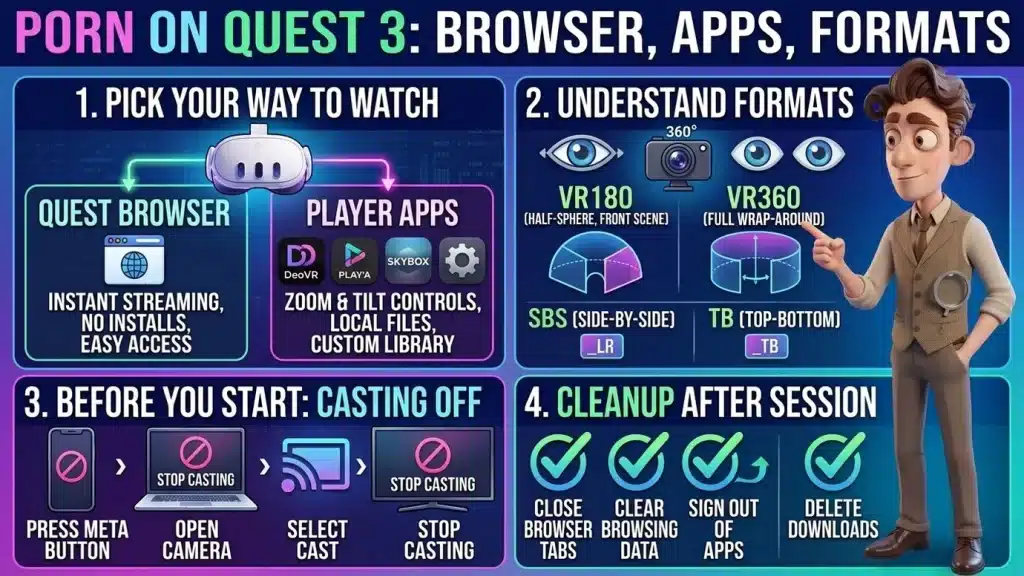
Image created using advanced AI technology, professionally refined by the PornPlanner editorial team.
A Meta Quest 3 or 3S gives you two ways to watch: the built-in browser or a player app. Here is what each one does, what 180, 360 and side-by-side mean, and how to leave nothing behind, casting included.
Can you watch porn on a Meta Quest 3 or 3S?
Yes, in 2 ways: through the Quest's built-in browser, or through a player app from the Meta Store. Both headsets handle both ways: PLAY'A's store page and DeoVR's app page list the Quest 3 and the Quest 3S as supported.
The difference between the two headsets is the picture. Meta's compare page lists 2064 x 2208 pixels per eye for the Quest 3 and 1832 x 1920 for the Quest 3S, so the same video looks sharper on the Quest 3.
I did not run these routes on a headset. Everything below comes from Meta's store pages, the apps' own pages and the help pages of three VR sites, all read at the time of writing, so treat it as a map and your own headset as the final word.
The browser needs nothing installed and plays a video inside the site's own player. A player app gives you more controls and can also play files that are stored on the headset.
Before you put the headset on, decide what the session looks like with the guide to picking porn by mood and minutes.
Quest Browser or a player app: which one do you need?
Pick by what you want to do tonight. Find yours in this list:
- Watch a site's video right now with nothing to install: use the Quest Browser (section 03).
- Get zoom, tilt and quality controls, or log in once and browse a site's library: use a player app (section 04).
- Play a file that is already on the headset or on your network: use a local player such as SKYBOX or PLAY'A (sections 04 and 06).
- Other people use the headset or the same Meta account: read sections 08 and 09 before you start.
You can mix them: stream in the browser while you decide, then move to an app for the sessions you repeat.
For the rest of the routine, how to watch porn without wasting the night covers minutes, mood and privacy before you press play.
What can the Quest Browser do for you?
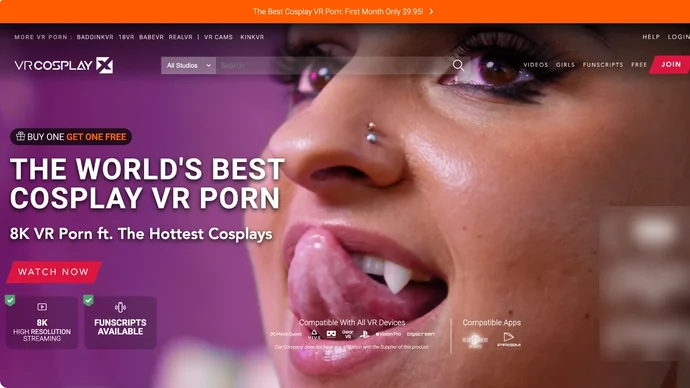
A VR studio front page that lists the headsets and apps it works with
It streams a VR video inside the site's own player, with no install. VRCosplayX's Meta Quest 3 help page says you can stream its whole catalog in the headset without downloading anything, and that all its streaming qualities show up in the Meta Quest Browser.
VRCosplayX's streaming guide adds a limit: it calls its in-browser player not optimized, and says features such as zoom and tilt may not work as well as in a dedicated player. Other sites send Quest owners straight to an app. VRSmash's guide for the Quest 2, 3, 3S and Pro tells you to install the PLAY'A player, not to use the browser.
The steps for a browser session are short:
- Open the Browser app on the headset.
- Go to the site and open the video's page.
- Press play and choose the streaming quality in the site's player.
- When you finish, close the tab.
Meta's notice for its browser says that in private mode it does not collect information about the websites you visit. Private mode is not invisibility, and a pop-up can still open a new tab, so the guide to why porn ads and pop-ups appear and how to block them is worth a read before you click anything that opens a new tab.
WankzVR's "how to watch VR porn" page lists Oculus, Valve, Vive, PSVR and Windows Mixed Reality headsets and does not name the Quest 3. VRCosplayX has a Quest 3 page and VRSmash has a Quest 3 section in its guide. Before you pay or install anything, look for your headset on the site's own help page.
Which player apps run on the Quest?
4 apps cover most needs, and each one fits a different habit. Here is what their own pages say:
- DeoVR: its Meta Store page describes streaming 8K and 4K VR videos, VR180 and 360 playback, local files and a personal library called DeoVR Drive. The store lists two versions, "DeoVR - VR Video Player" and "DeoVR Classic - VR Video Player", so check which one you install. DeoVR's own app page lists the Meta Quest 3 and 3S.
- PLAY'A: its store page says it recognizes 2D, 3D, flat, fisheye, 180 and 360 videos automatically, plays local files or network streams, and has privacy modes. VRSmash says the app is free and shows you how to add the site inside it.
- SKYBOX: a local player, listed at 9.99 euros at the time of writing. It plays MP4, MKV, MOV, WEBM and AV1 among others, in 2D, side-by-side, top-bottom, 180, 360, 200 and 220, and reads from a media server, a network share or a USB drive.
- HereSphere: a player for people who like settings. Its FAQ says it reads the format from the file name and can stream from sites that support it. VRCosplayX says it is not on the Meta Store and needs sideloading, while HereSphere's download page links a Quest store listing and a free demo, so look at what your own store shows.
SexLikeReal's front page lists Meta Quest models among its supported headsets, points to its own free VR app and mentions DeoVR. It gives no install steps, so check its app page on your headset.
Whichever app you pick, the 10-minute check on whether a porn site is safe applies before you log in to a site inside an app.
What do 180, 360 and side-by-side mean?
They are the labels that tell a player how a VR video is laid out, and the files come in a handful of types. This is the one-minute version:
- 180: the scene is a half-sphere in front of you. WankzVR describes its headset videos as 180 degrees.
- 360: the scene wraps all the way around you, so you can turn your head in any direction.
- Side-by-side (SBS): the left-eye and right-eye pictures sit next to each other in the file. HereSphere marks this with "_LR" in the file name.
- Top-bottom (TB): the two eyes' pictures are stacked, one above the other. HereSphere marks this with "_TB".
- 2D or flat: a normal rectangle, with no depth.
The numbers on a download menu, such as 4K, 6K or 8K, refer to resolution, and VRCosplayX says all its download options run at 60 frames per second except the smartphone one. The H264 or H265 label on a file is the encoding, and the same site calls it largely irrelevant to your viewing.
Pick the file the site marks for your headset. At the time of writing, VRCosplayX's download menu recommends 8K files for the Meta Quest 3, which also play on the Quest 2. HereSphere's FAQ warns that 10-bit H.264 files are not supported. For quality and whole scenes, read how to find and stream whole scenes in HD.
Should you stream or download?

A VR studio page that labels the resolution of every scene
Stream when your connection is good, and download when it is not. Streaming uses no storage, and VRCosplayX says it works as long as the internet connection is good enough.
Downloading suits slow or unreliable Wi-Fi, a scene you want to keep, or a session without internet. VRSmash's guide shows it as: pick a video, choose Download, then choose the resolution. WankzVR's page says its videos come as streaming or downloadable playback.
A download is a file on the headset, so it is also a trace. Meta lists 128GB of base storage for the Quest 3S and 512GB for the Quest 3, so check the file size first. Use only the site's own download button, and read how porn free trials work, from rebills to cancelling in time before you give a card to unlock either option.
Which method does what, at a glance?
This table puts 5 methods side by side: the formats each handles, how it plays, what to check for privacy and how you start.
| Method | Formats | Stream or download | Privacy | Steps |
|---|---|---|---|---|
| Quest Browser | Whatever the site's own player serves | Streaming in the site's player | Private mode; clear the browsing data | Open Browser, go to the site, press play |
| PLAY'A | 2D, 3D, flat, fisheye, 180, 360, found automatically | Local files and network streams; sites added inside the app | Has privacy modes; the store page lists storage and microphone access | Install from the Meta Store, Websites, Add Sites, type the site |
| DeoVR | VR180, 360, mono and stereo | Streams 8K and 4K; plays local files; DeoVR Drive | The store page says it may read your display name, avatar and followers list | Install from the Meta Store, pick the library or local files |
| SKYBOX | 2D, SBS, TB, VR180, 360, 200, 220 | Local files, USB drive, media server or network share | The store page lists the same Meta profile access as DeoVR | Install it, then point it at your files or server |
| HereSphere | File name suffixes such as _LR, _TB, _180, _360, or auto-detect | Local files; a Web Stream button for supported sites | Its FAQ links a privacy policy and says nothing about data | Get it from its download page, as a store listing, a demo or a sideload |
If a method needs a membership, monthly, yearly and lifetime porn subscriptions compared shows what the plans cost over time.
How do you make sure casting is off?
Check it before you open anything, because casting sends what you see to another screen. A phone or computer that is receiving a cast shows your headset view live.
Meta's community team gives this path to stop it. Press the Meta button on your controller to open the universal menu, select Camera, select Cast, then select Stop Casting. Casting also ends by itself when the headset goes to sleep, according to a Meta support article for the Quest 3S.
Before each session, run these 3 checks:
- Open Camera in the universal menu and look at Cast. If it is on, stop it.
- Check the Meta Horizon app on your phone for an active cast.
- Look at every screen in the room that could receive a cast, such as a TV.
If you want the big screen on purpose, the guide to watching porn on your TV with a browser, casting or AirPlay covers the TV side.
How do you clean up after a session?
Run these 5 cleanup checks before you take the headset off. Each one takes seconds.
- Close the browser tab and clear the browsing data. If you used private mode, check that no normal tab is still open.
- Sign out of site accounts inside the player apps, so the next person does not open your library.
- Delete the downloads you do not plan to watch again. A file stays on the headset until you remove it.
- Look at each app's recent list. The store pages I read do not describe a history feature, so open the app and check for yourself.
- Know what the app can read. The DeoVR and SKYBOX store pages say they may access your display name, username, avatar and followers list, so use a display name that suits a shared headset.
None of this hides the site from your Wi-Fi or your provider. What incognito mode hides and from whom explains where that line sits.
FAQ
These are quick answers to the questions that come up once the headset is on.
Does the Quest 3S play the same videos as the Quest 3?
Yes. PLAY'A's store page lists both headsets as supported, and the files are the same. The Quest 3 shows more pixels per eye, so the picture is sharper.
Do I need a computer or a cable?
No. Both ways in this guide run on the headset alone. VRSmash lists the Quest 3 and 3S among the standalone headsets it supports.
Is the Quest Browser enough?
For watching, yes. For zoom, tilt and a saved library, a player app is better, and VRCosplayX says its own in-browser player is not optimized.
Can I watch live VR cams on the Quest?
Some sites offer them, but I did not check a cam room on a headset. VRSmash lists VR cams next to its videos, and the directory includes Stripchat's VR cams. The details of that cam site are in the Stripchat review of free rooms, tokens and a weekly budget.
Which file should I download for the Quest 3?
The one the site marks for your headset. VRCosplayX shows 8K files as its recommendation for the Meta Quest 3.
Can a partner watch with me?
Only one person wears the headset, and a cast shows the same view on a screen. The rules for a shared screen are in planning a porn night for two.
- Pick the way by the night: the Quest Browser to watch right now, a player app for controls and files.
- Read the labels: 180 or 360, side-by-side or top-bottom, and the file the site marks for your headset.
- Stream on good Wi-Fi, download on weak Wi-Fi, and remember a download is a file on the headset.
- Turn casting off before you start: universal menu, Camera, Cast, Stop Casting.
- Run the 5 cleanup checks before you take the headset off.
Once the headset is ready, browse our hand-picked directory of the best porn sites, including its virtual reality list, and choose what goes on your next session.